
If you have ever signed up for a new project management tool and stared at an empty board — wondering which template to pick, what columns to create, and how many hours of structure-building lie ahead — you already know the problem.
Most tools hand you a blank slate and a wall of templates and expect you to know exactly how your organisation should be set up. So your first day is spent building, not working. The value of the tool — a board that actually reflects how your team works — arrives days later, if it arrives at all.
Qanban does it differently. Our AI Onboarding reads a single sentence in plain English, and builds your entire project around it — project, board, tasks and stories – before you finish your coffee. Sign up, describe what you want to do, and land on a working Kanban board in under 5 minutes. No templates to choose, no structure to design, no credit card required.
Learn more about how our AI-Generated Kanban Boards work.
The Problem with Traditional Onboarding
Here is the unspoken contract most project management tools make with new users: “We’ve given you the tool. Now go build your workflow.”
That means:
- Blank-slate anxiety. A new account arrives empty. Before you can manage a single task, you have to decide your hierarchy, your statuses, your columns.
- Template roulette. The fix most tools offer is a library of templates. But templates are generic — you still bend your real work to fit a pre-built shape instead of the other way around.
- Manual structure-building. Adding projects, teams, tasks and stories by hand takes hours — time that should be spent running the work, not setting it up.
- Days to first value. By the time everything is configured, the moment of motivation from signing up has long passed.
Qanban was built to close that gap. Onboarding should not be a project. It should be a conversation.
What Is Qanban AI Onboarding?
Qanban AI Onboarding is a conversational setup experience powered by AI, built into the first minutes of your Qanban account. Instead of a blank board and a template gallery, you meet a dialog that asks what you want to build — and then builds it.
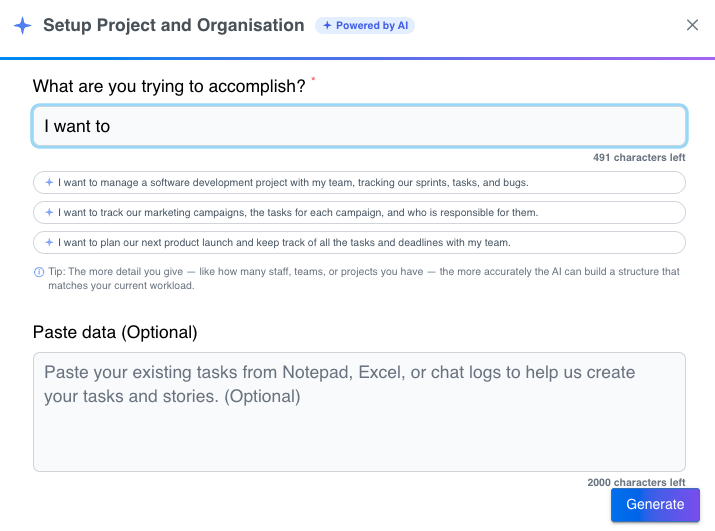
It works like this:
- Describe what you want in one sentence. A simple “I want to…” prompt — for example, “I want to manage a software development project with my team, tracking our sprints, tasks, and bugs.”
- Not sure how to describe it? One-click example prompts cover the most common starting points — a software development project, a marketing campaign tracker, or a product launch plan — each with realistic tasks, owners and deadlines built in.
- Already have your tasks somewhere? Paste your existing work from Notepad, Excel, or a chat log, and Qanban’s AI turns it into properly structured tasks and stories. No retyping. No re-keying.
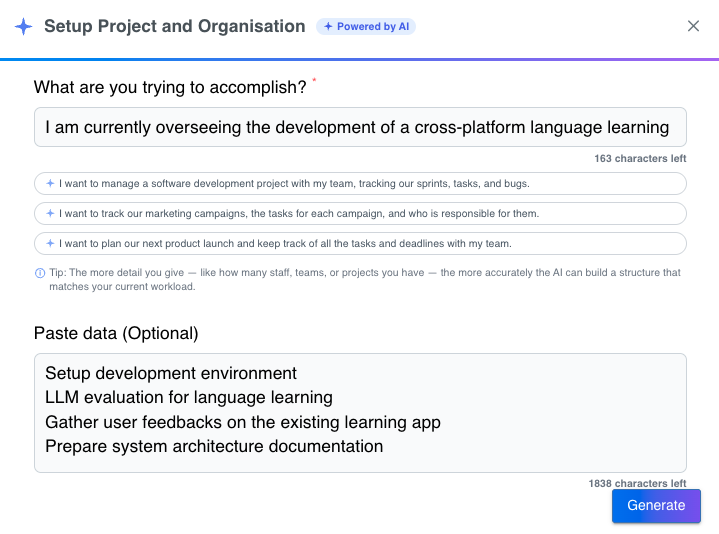
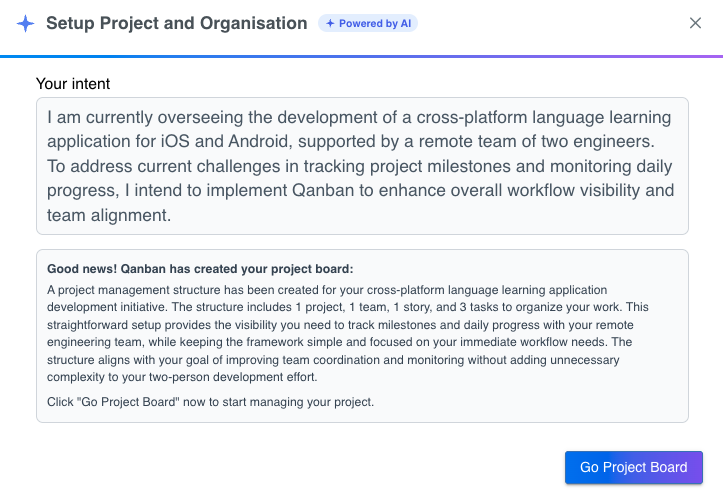
The AI does not hand you a skeleton. It reads your intent, makes sensible decisions about how your project should be organised, and creates the work items for you — grounded in a full work-item hierarchy (Epic → Feature → Story → Task) so the result is something you can actually run, not a flat to-do list.
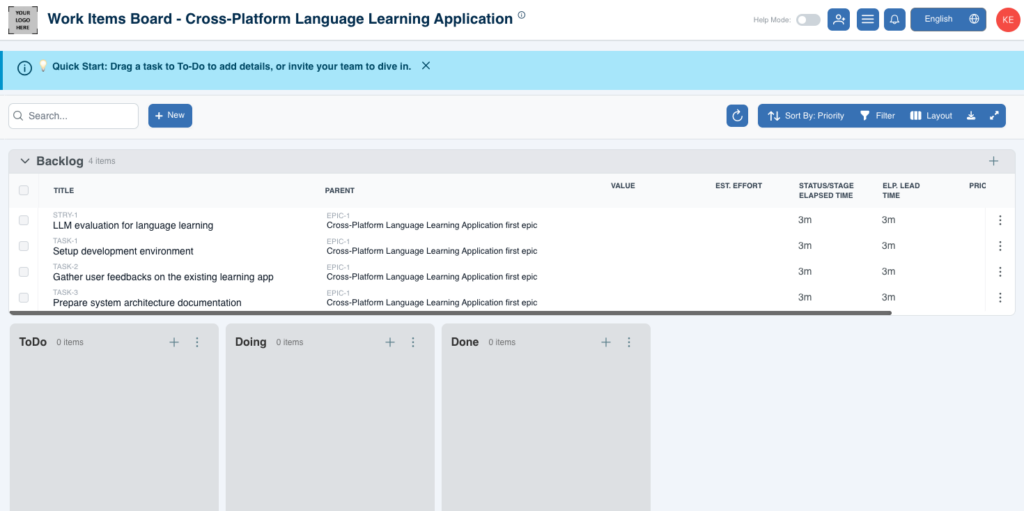
From Signup to Board in Under 5 Minutes
Here is the entire flow — start to finish:
- Sign up for your free Qanban account.
- Create your workspace — and Qanban immediately opens the AI Onboarding dialog.
- Type what you want to do. One sentence is enough. Pick an example prompt, or write your own.
- Optional: paste your existing tasks to seed your board with the work you already have.
- Let the AI think. Qanban works in the background to design your project structure.
- Your board is created. The AI tells you exactly what it built.
- Click “Go Project Board” — and land directly on your new Kanban board, ready to work.
No admin setup. No role configuration. No org-chart drawing. The whole journey — from “I want to track our marketing campaigns” to a live board with tasks on it — fits comfortably inside 5 minutes.
Where the dialog appears. AI Onboarding opens the moment you need a workspace — so you never have to go hunting for it:
- Right after you sign up — create your first workspace and the AI Onboarding dialog opens automatically.
- Any time you add a workspace — use the + on the workspace menu and the dialog appears once your new workspace is created.
- From Settings → Workspace — create a new workspace there and AI Onboarding is ready to set it up.
A Conversation, Not a One-Shot
Where most AI setup tools are a one-shot guess, Qanban AI Onboarding talks back when it needs more from you.
- Not enough detail? Instead of guessing or giving up, the AI asks a follow-up question to understand what you are building, so the result matches your intent.
- Stuck on wording? Qanban offers a ready-made example you can paste straight back — no need to be a prompt engineer.
- Still ambiguous? If the AI genuinely cannot tell what you need, it tells you honestly and points you to the manual setup path. You are never left with a half-built, wrong-shaped project.
This is the difference between “a prompt” and “an onboarding experience” — a setup that understands what you are trying to do, and steers you to a good result.
What the AI Actually Builds
A project in Qanban is not just a board. It is an organisation of work:
- A project — named and structured around your intent.
- A Kanban board — with the statuses and stages your workflow needs.
- Work items — tasks and stories that match what you described, laid out across the full work-item hierarchy (Epic → Feature → Story → Task).
And because you can paste in your existing tasks, the board you land on is not empty — it contains the work you already had, reorganised into a structure you can manage.
Your First Day, Designed
Getting a board built is only half the story. Qanban also designs the first minutes after onboarding:
- A Quick Start banner on your new project board shows you the first thing to try — drag a task to add details, or invite your team to dive in.
- The backlog opens itself with a gentle attention highlight, guiding your eye to where work actually starts.
- The “Invite your team” button flashes with a pointer letting you know your teammates are one click away.
Onboarding in Qanban does not stop at “board created.” It carries you through your first day until your team is in and the work is moving.
How the Industry Uses AI for Setup
Plenty of tools now ship an AI assistant. Most of them treat AI as an add-on you invoke after the hard setup is done:
- Jira (Atlassian Intelligence / Rovo) — natural-language search, automation building and AI-assisted work breakdown, but AI is an optional layer that rolls out on premium plans. You still build your project by hand first.
- monday.com (monday AI) — an assistant that can generate content and column suggestions, but AI must be admin-enabled and actions consume credits. It is a tool you call, not the way you start.
- ClickUp (ClickUp Brain) and Asana (Asana Intelligence) — AI that summarizes, drafts and breaks down work from inside an existing, already-configured project.
| Feature / Tool | Traditional Tools (Jira, monday, ClickUp) | Qanban |
| Setup Approach | Manual template pick + blank board | Conversational 1-sentence prompt |
| AI Availability | Paid add-on / Admin-enabled | Native on Free Plan |
| Work Item Hierarchy | Manual configuration | Auto-structured (Epic → Story → Task) |
| Time to Working Board | Hours to days | Under 5 minutes |
The pattern is consistent: with most tools, AI is something you buy and bolt on. With Qanban, AI is how you start — the very first screen a new user meets, included on the free plan, working from the moment you sign up.
Who Is Qanban AI Onboarding For?
- Founders and small teams who need a project board up today, not after an afternoon of setup.
- Marketing, operations and product leads who want to describe how their team works — in plain language — and get a matching board back.
- Agency owners and consultants who spin up client projects regularly and need them structured fast.
- Anyone migrating from spreadsheets and chat logs — paste in what you already have and let the AI organise it.
- Teams without a dedicated admin who don’t want to learn project-management configuration before they can use a project management tool.
Whether you are a solo founder starting your first project or a team that has tried a dozen tools and never got past the setup screen, Qanban AI Onboarding gives you the same thing: a real project board, built from your words, in minutes.
Get Started Today — Free
Qanban AI Onboarding is ready right now. Sign up for a free Qanban account, create your workspace, and tell the AI what you want to build. Your project board — complete with tasks, stories and a board to run — is minutes away. No credit card required. No templates to pick. No structure to build.
From your first sentence to your first board in under 5 minutes. Stop building your tool. Start running your work.
Frequently Asked Questions
Is my data safe with Qanban AI Onboarding? Yes. Your intent and any pasted task data are used only to build your project structure. Qanban applies the same security and privacy standards to AI-assisted setup as to the rest of the platform.
Can I import work I already have? Yes. Paste tasks from Notepad, Excel, or chat logs into the setup dialog and Qanban’s AI converts them into structured tasks and stories — so your board starts with real work, not blank cards.
What if the AI doesn’t understand what I want? Qanban asks a follow-up question when your intent needs more detail, and offers a ready-made example you can paste back. If it still cannot tell, it points you to manual setup rather than guessing.
Which Qanban plans include AI Onboarding? AI Onboarding is included when you create a workspace — no separate AI subscription and no per-action credits required.
Do I still have to design my organisation structure myself? No. That is the point. The AI builds your project, board, and work items from your description, using Qanban’s full work-item hierarchy so the structure is already sensible.
How long does setup really take? From signup to a working project board, comfortably under 5 minutes — usually much faster.